

CSTV Discord Integration
Automatically post CS2 demo recordings to Discord via webhook.
Pro Feature
This plugin requires both a Pro server and CSTV enabled.
Overview
The CSTV Discord plugin automatically sends demo download links to your Discord server whenever a match is recorded. Perfect for teams and communities that want to review matches and preserve demos.
Requirements
- Pro server with CSTV enabled
- Discord server with appropriate permissions
- Webhook URL from Discord
Features
- Automatic demo URL posting to Discord
- Match information in notifications
- Direct download links
- Configurable webhook integration
- No manual upload needed
Discord Webhook Setup
Creating a Webhook
- Open Discord and navigate to your server
- Right-click the channel where you want demo links posted
- Select Edit Channel
- Navigate to Integrations → Webhooks
- Click New Webhook
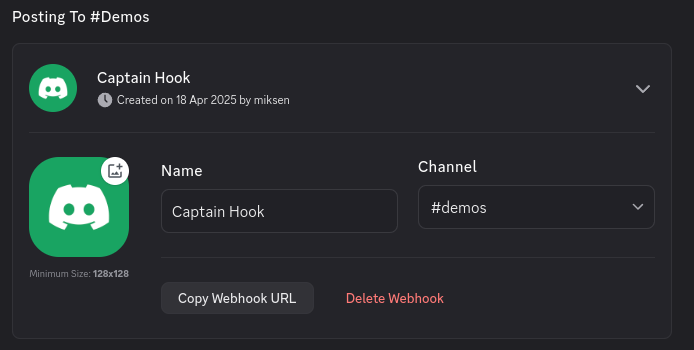
Configuring the Webhook
Customize your webhook:
- Name - Choose any name (e.g., "CS2 Demos", "Match Recordings")
- Avatar - Optional custom avatar for webhook posts
- Channel - Select target channel for demo notifications
Getting the Webhook URL
- Click Copy Webhook URL
- Save this URL - you'll need it for server configuration
Multiple Channels
You can create multiple webhooks pointing to different channels for organizing demos by team, tournament, or practice vs. competitive matches.
Server Configuration
Adding Webhook to Server
- Log in to your Pro Panel
- Open the Settings tab on your server's page. It opens on Game settings
- Scroll down to the CSTV section and set Enable CSTV to Yes. The webhook field only appears when CSTV is enabled
- Locate the Discord webhook URL (optional) field in the same section
- Paste your webhook URL
- Click Save changes
- Restart your CS2 server to apply changes
Restart Required
The server must be restarted for the webhook configuration to take effect.
Enabling CSTV
If CSTV isn't already enabled:
- In your Pro Panel, open Settings → Game settings and set Enable CSTV to Yes
- Optionally fill in CSTV password (optional). The CSTV port is assigned automatically
- Click Save changes and restart the server
See the CSTV Guide for detailed CSTV configuration.
How It Works
Automatic Demo Posting
When a match completes and CSTV recording stops:
- Demo file is automatically generated on server
- Plugin detects the new demo file
- Download URL is created
- Webhook sends notification to Discord with:
- Match information
- Team names (if available)
- Map played
- Direct download link
- Timestamp
Notification Example
Discord notifications typically include:
🎬 New CS2 Demo Available

Map: de_dust2
Match: TeamA vs TeamB
Date: 2025-12-27 10:30 UTC

Download: [Click here to download]
Demo Management
Accessing Demos
Via Discord:
- Click the download link in Discord
- Demo downloads directly to your computer
Via Server:
- Connect via FTP
- Navigate to
/demos - Download
.demfiles manually
Playing Demos
See the CSTV Guide for instructions on playing downloaded demos.
Troubleshooting
Webhook not posting to Discord
Check:
- Webhook URL is correct and complete
- Webhook hasn't been deleted in Discord
- Bot permissions in Discord channel allow posting
- Server has been restarted after adding webhook
- CSTV is enabled and recording demos
Wrong channel receiving notifications
Verify the webhook is configured for the intended channel in Discord. Each webhook is tied to a specific channel.
Demo links not working
Ensure your server has proper demo file storage configured and demos are being saved to the correct directory.
No notifications after matches
Verify:
- CSTV is enabled and recording
- Matches are completing properly
- Demo files are being generated (
/demos/directory) - Webhook URL is correctly saved in panel
Advanced Configuration
Multiple Webhooks
For organizations with multiple servers or teams:
- Create separate webhooks for each server/team
- Configure each server with its specific webhook
- Organize Discord channels by server or team
Example structure:
#team-a-demos
#team-b-demos
#practice-demos
#tournament-demos
Custom Webhook Names
Customize webhook display names to identify the source:
- "Pro Server 1 - Demos"
- "Practice Server - Recordings"
- "TeamName - Match Demos"
Webhook Security
Keep Webhook URLs Private
Webhook URLs allow anyone with the URL to post to your Discord channel. Never share webhook URLs publicly.
If compromised:
- Delete the old webhook in Discord
- Create a new webhook
- Update server configuration
- Restart server
Best Practices
Keeping Demos Findable
Point practice and competitive servers at different Discord channels. Scrim demos pile up fast, and mixing them with match demos makes the channel hard to search later.
Storage
Demos are deleted from the server automatically after 7 days. Download anything worth keeping soon after the match. The Discord upload is not affected, so the copy in your channel stays. See Demo Monitor for where the files live.
Limitations
- Requires Pro server
- CSTV must be enabled and functional
- Limited to Discord webhook functionality
- No retroactive posting of old demos
- Webhook rate limits apply (Discord side)
Additional Features
Match Information
When using match management plugins (like MatchZy), notifications can include:
- Team names
- Player rosters
- Match scores
- Round counts
- Server configuration used
File Naming
Demos are typically named with:
- Date and time
- Map name
- Team names (if configured)
- Match ID (if applicable)
Example: 2025-12-27_14-30-45_de_dust2_TeamA_vs_TeamB.dem
Related Resources
- CSTV Setup Guide - Enable and configure CSTV
- MatchZy Plugin - Enhanced match information
- Demo Playback - How to watch demos
- Discord Support - Get help with setup