

Custom Maps and FastDL
How to add your own maps to a Counter-Strike 1.6 Pro server and let players download them quickly with FastDL.
Pro Server Only
Uploading maps needs FTP, which is only available on Pro servers. On free servers, pick a map from our map library.
Check Our Map Library First
Many custom maps are already available. Browse the CS 1.6 map library. If the map you want is there but not on your server yet, ask on a ticket and we install it for you. You do not need FTP or FastDL for maps from the library.
What You Need
- FTP access. Ask for it on a ticket with the FTP category, see FTP Access
- FastDL, if players should download the map quickly. Ask for it on the same ticket
- The map files. A map is at least a
.bspfile. Many maps also need.wadtextures, models, sounds or sprites
Map File Names
Use only letters, numbers and underscores in the map name, for example de_mymap.bsp. The Pro Panel cannot start the server on a map with - or . in its name.
Step 1: Upload the Map
- Connect with FTP
- Open the
cstrikefolder - Upload each file to the folder it belongs in:
| File | Folder |
|---|---|
de_mymap.bsp | cstrike/maps |
de_mymap.res (list of extra files) | cstrike/maps |
de_mymap.txt (map description) | cstrike/maps |
.wad texture files | cstrike |
Models (.mdl) | cstrike/models |
Sounds (.wav) | cstrike/sound |
Sprites (.spr) | cstrike/sprites |
| Overview images | cstrike/overviews |
Keep the folder layout that comes with the map. If the download has a maps folder and a sound folder, they go into cstrike/maps and cstrike/sound.
Step 2: Add the Map to the Rotation
- Download
cstrike/mapcycle.txt - Add the map name without
.bspon a new line:
de_dust2
de_inferno
de_mymap- Upload the file again
To start the server on the map, open Game settings on the Settings tab, click Enter a custom map name under Map, and type the name without the extension. Click Save changes.
Step 3: Turn On FastDL
Without FastDL, players download custom files through the game server, which is very slow. FastDL serves the files from a web server instead.
Ask for FastDL on your FTP ticket
Once it is set up, the Files tab shows a FastDL box. Copy Your FastDL URL with the copy icon
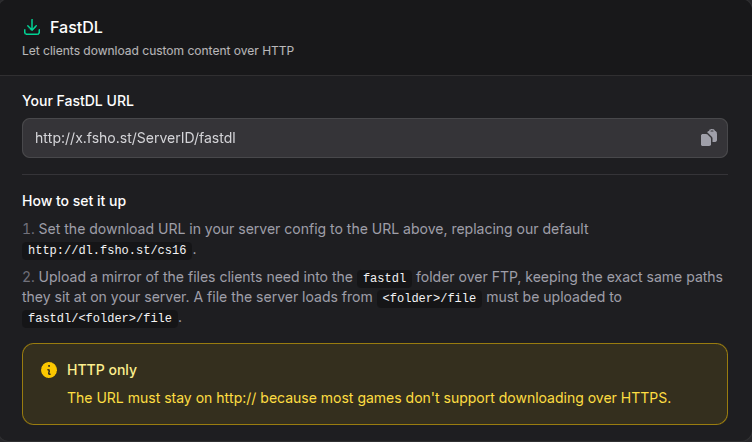
The URL has the form
http://X.fsho.st/ServerID/fastdl.X.fsho.stis the address of the location your CS 1.6 Pro server runs in, for example our server in Frankfurt or Helsinki. Each location has its own address, and it is the same as the FTP Host.ServerIDis your server number, the number in P1234. Always copy your own URL from the Files tab. On this page we usehttp://X.fsho.st/1234/fastdlas the example, so replace it with yoursOpen your config template
cstrike/cfg/pro/fshost_template_1234.cfg. See Config Files for why you edit this fileReplace the default URL in the
sv_downloadurlline with yours:
sv_downloadurl "http://X.fsho.st/1234/fastdl"- Upload the template, click Save changes in Game settings, and restart the server
HTTP Only
Keep the URL on http://. CS 1.6 cannot download over https://.
Your FastDL Replaces Ours
The template points at our map library, http://dl.fsho.st/cs16, by default. Once you change it to your own URL, players download every custom file from your FastDL. Upload all custom content the server uses, including maps we installed for you.
Step 4: Add the Files to FastDL
Upload a copy of every file players need into the fastdl folder, with the same paths they have under cstrike. A file the server loads from maps/de_mymap.bsp goes to fastdl/maps/de_mymap.bsp.
| On the server | On FastDL |
|---|---|
cstrike/maps/de_mymap.bsp | fastdl/maps/de_mymap.bsp |
cstrike/mywad.wad | fastdl/mywad.wad |
cstrike/sound/mymap/ambient.wav | fastdl/sound/mymap/ambient.wav |
cstrike/models/mymap/tree.mdl | fastdl/models/mymap/tree.mdl |
The fastdl folder accepts these file types: .bsp, .wad, .mdl, .spr, .wav, .bmp, .tga and .nav. Other files, such as .res and .txt, are refused. Players do not need them, so leave them on the server only.
Upload the files uncompressed. The folder also accepts .bz2, .ff and .iwd for other games, but CS 1.6 cannot download compressed files.
Step 5: Test
- Delete the map from your own game folder if you have it, so you download it like a new player
- Join the server and change to the map with RCON:
rcon changelevel de_mymap- The download should take a few seconds. If it is slow, the file was not found on FastDL and the game fell back to the server
Troubleshooting
The server does not start on my map
- Check the name under Map matches the
.bspfile name exactly, without.bsp - Map names may only use letters, numbers and underscores
- Check the
.bspis incstrike/maps
Players get "missing file" or crash when joining
The map needs a file that is not on the server or not on FastDL. Open the map's .res file or its readme to see which files it needs, and upload them to both places.
Downloads are still slow
- Check that
sv_downloadurlis in your template, not in the generated config, and that you saved Game settings and restarted - Check the URL starts with
http://, nothttps:// - Open the file in a browser, for example
http://X.fsho.st/1234/fastdl/maps/de_mymap.bsp. If it does not download, the path infastdlis wrong - File and folder names are case sensitive.
Maps/De_MyMap.bspandmaps/de_mymap.bspare different files
FTP refuses my upload to fastdl
Only the file types listed in Step 4 are accepted. Upload other files to cstrike only.