

Billing and Top-Up
Pro servers are paid from your FSHOST account balance. You add money with a top-up, and each server takes its monthly price from that balance. There is no subscription, so nothing is charged to your card unless you top up yourself.
Pro Server Only
Billing and top-ups are part of the Pro Panel. Free servers cost nothing and have no balance.
How Charging Works
- Starting a new or expired server takes one month's price from your balance. The server then runs until the same date next month.
- On the renewal date, a running server is renewed automatically if your balance holds at least the monthly price.
- If your balance is too low on the renewal date, the server is stopped. It stays on your account with all its files.
- Stopped servers are not charged. A server that is stopped when its renewal date passes simply expires. Nothing is taken from your balance.
Stopping a server does not pause the time you have paid for. The renewal date stays the same whether the server is running or stopped.
Stopped Servers and Deletion
A stopped server is kept for free for a generous period. If your server has been stopped for one month, you receive two warning emails:
| Server is deleted | |
|---|---|
| First warning | One week after the email |
| Second warning | One day after the email |
Starting the server resets the deletion timer.
Top Up Your Balance
Step 1: Open the Top-Up Page
Click Top Up in the Pro Panel menu, or go to fshost.me/pro/top-up.
Step 2: Choose an Amount and Pay
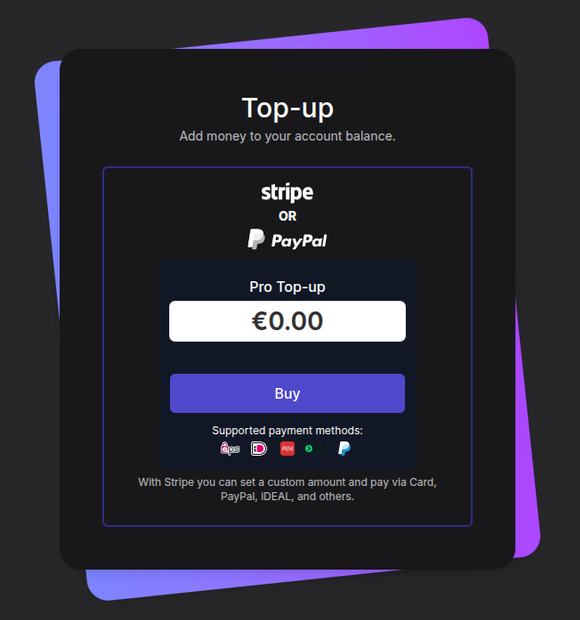
- Type the amount you want to add in the Pro Top-up box
- Click Buy
- Pick a payment method on the Stripe checkout page and complete the payment
Payments go through Stripe. You can pay with card, PayPal, iDEAL and other methods. The methods offered depend on your country, and the icons under Supported payment methods show the main ones.
Below the payment box, the Pricing table lists each game, its Available locations and its Price per month. Top up at least the monthly price of the server you want to run.
Step 3: Check Your Balance
When the payment is done you land on Payment completed, which confirms the amount added to your account balance. The top-up also appears in the Top-ups list on the Billing page.
The Billing Page
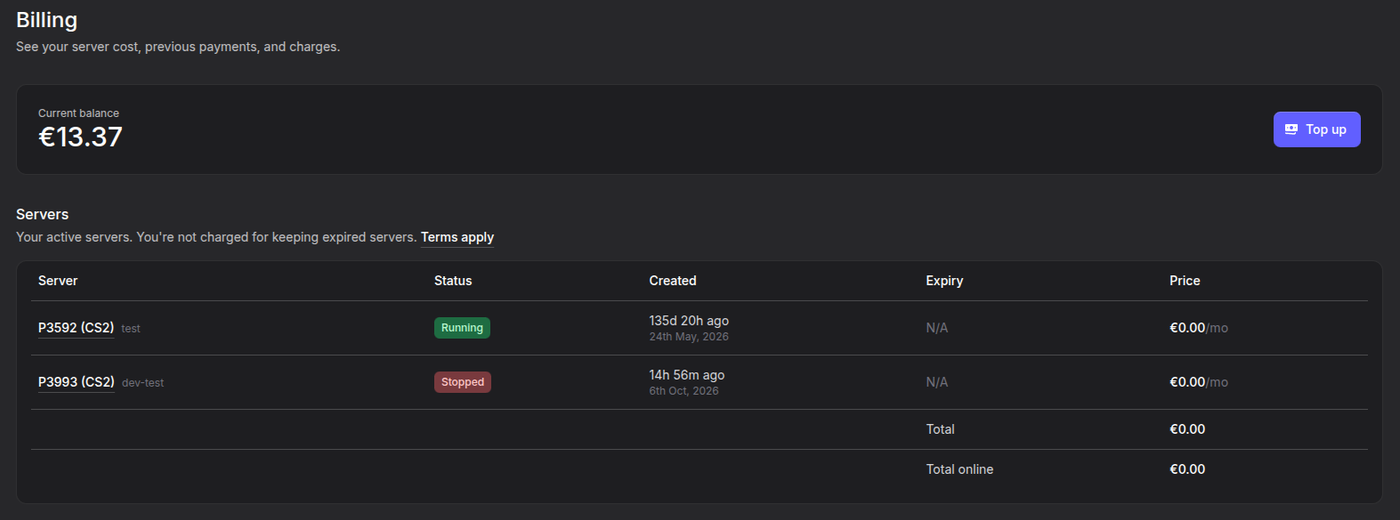
Click Billing in the Pro Panel menu, or go to fshost.me/pro/billing. It covers all your servers in one place.
| Section | What it shows |
|---|---|
| Current balance | Your account balance, with a Top up button |
| Servers | Each server with its Status, Created date, Expiry and monthly Price |
| Charges | Every charge taken from your balance, per server and date |
| Top-ups | Every top-up you have made, with amount and date |
Below the Servers table are two totals:
- Total - The monthly price of all your servers added together
- Total online - The monthly price of the servers that are running right now
An Expiry shown in red has already passed. N/A means the server has no renewal date, either because it is free or because it has not been started for the first time yet. Charges for a server you have since deleted show as Deleted server.
The Server Billing Tab
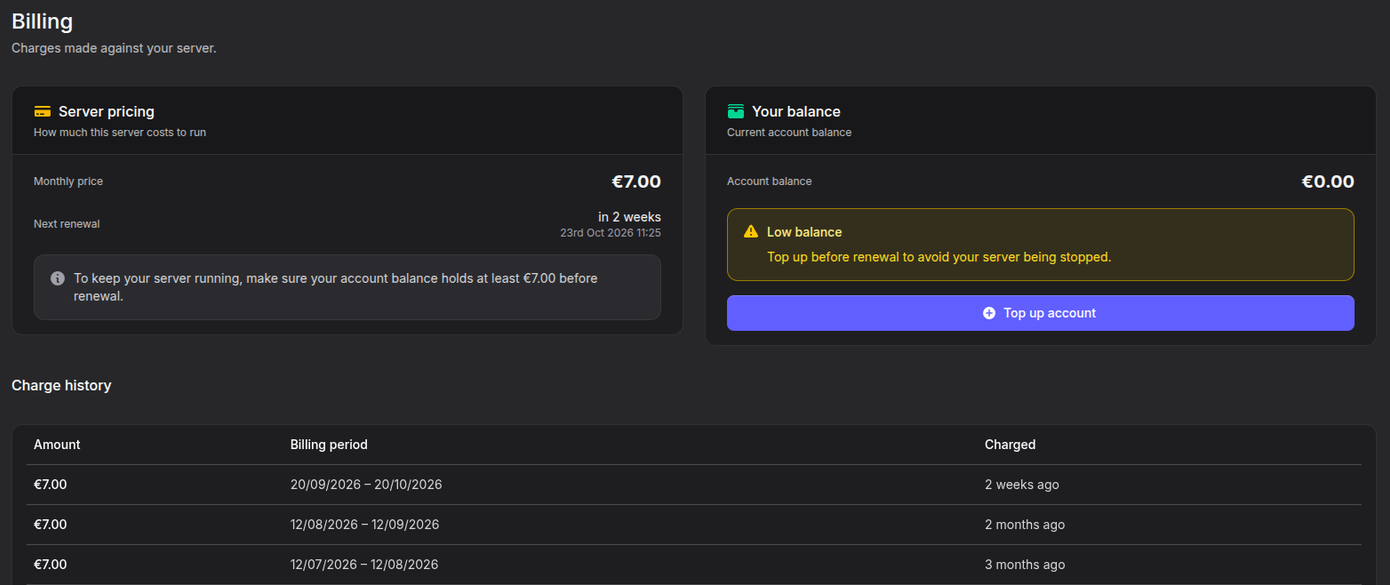
Each server also has its own Billing tab with the details for that server only.
- Go to the Pro Panel
- Click on your server name
- Open the Billing tab
| Box | What it shows |
|---|---|
| Server pricing | Monthly price, and Next renewal or Expired with the date |
| Your balance | Your Account balance and whether it covers the next renewal |
| Charge history | Each charge with Amount, Billing period and when it was Charged |
The Your balance box tells you where you stand:
| Message | Meaning |
|---|---|
| Balance OK | You have enough for the next renewal |
| Low balance | Top up before the renewal date, or the server is stopped |
| Ready to renew | The server has expired, and starting it renews it |
| Insufficient balance | The server has expired, and you need the shown amount more to renew it |
A server with a price of €0.00 shows Free server instead. It is never charged.
Renew an Expired Server
- Make sure your balance holds at least the monthly price. Top up if needed.
- Click Start on the server.
- A window titled Starting P(number) renews it opens. It shows the Renewal price, your Balance now and your Balance after.
- Click Renew and start.
The window also shows the date the server will run until. If your balance is too low, it shows how much you are Short by and a Top up account button instead.
Team Members
A team member can start an expired server. The renewal is always paid from the owner's balance, never the team member's. Team members cannot open the Billing tab. See Team Access.
Deleting a Server
A paid server can only be deleted once it has expired. Until then, the time is already paid for and the delete option is not shown.
Deletion Is Permanent
Deleting a server removes everything on it, including your configuration and any uploaded files. It cannot be undone. Download anything you want to keep first.
Refunds
We do not normally refund unused time after a server has been started. If you have a problem with a payment or with server performance, contact us first. Depending on the situation we can:
- Return the amount to your account balance
- Reset the server expiry date
- Extend the server expiry date
A refund back to your card or PayPal goes through our payment processor. Their fees cannot be refunded, and all data on the server is permanently deleted. Read the full Refund Policy before asking.
Chargebacks
Do not open a chargeback with your bank or PayPal. For each chargeback, the processor fee plus €15 is deducted from your account. Contact us instead and we will sort it out.
Troubleshooting
My server stopped on its own
Your balance was probably lower than the monthly price on the renewal date. Open the Billing tab on the server. If it says Insufficient balance, top up the amount shown and click Start.
Scheduled restarts and updates also show up in the Actions tab as FSHOST with user type Bot. Those start the server again on their own.
My top-up does not show in my balance
Check the Top-ups list on the Billing page. If the payment is not there, open a ticket on Pro Support with:
- The email of your FSHOST account
- The date of the top-up
- The amount
Clicking Start asks me to pay
The server has expired, or it has never been started. Starting it takes one month's price from your balance. Click Cancel if you do not want to renew it now.
I cannot delete my server
A paid server can only be deleted after it has expired. Stop the server and wait until its renewal date has passed. Stopped servers are not charged in the meantime.
I was charged for a server I did not use
Charges are only taken when a server is started, or renewed while running. Check the Actions tab to see who started the server and when. If a team member started it, the renewal is paid from your balance. If something still looks wrong, contact Pro Support.