

Support Tickets
Pro customers get priority support through tickets in the Pro Panel. Staff replies arrive by email and on the ticket page, so you do not have to keep the page open.
Pro Server Only
Tickets are available once you have had a Pro server or made a top-up. Free server users can ask for help on our Discord.
Open the Support Page
Click Support in the Pro Panel menu, or go to fshost.me/pro/support.
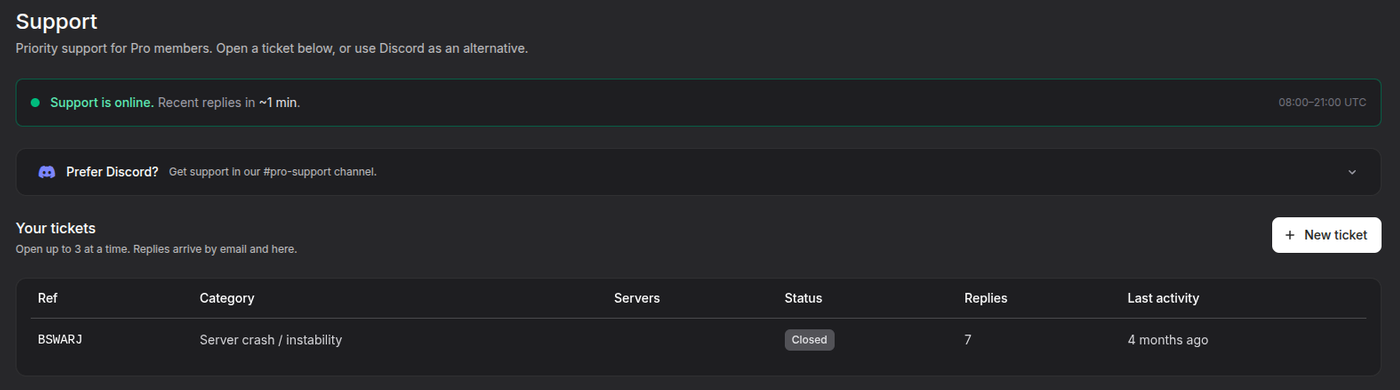
The bar at the top shows whether support is online right now, the support hours in UTC and how fast staff have replied recently. Outside support hours it says Support is offline and when it is next online. You can still open a ticket at any time, and it is answered when staff are back.
Your tickets lists every ticket you have opened, with its Ref, Category, related Servers, Status, number of Replies and Last activity. Click a row to open the ticket.
Open a Ticket
Step 1: Click New Ticket
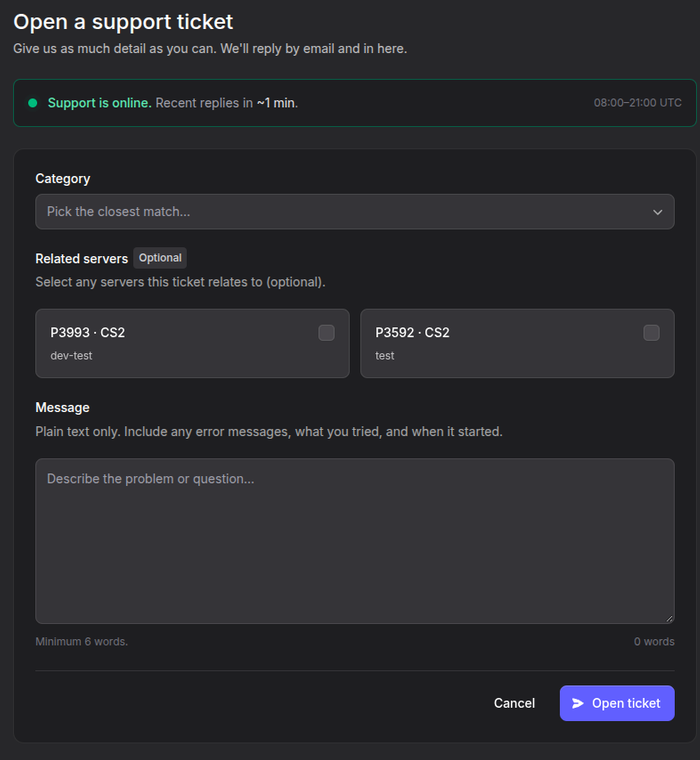
Click New ticket on the Support page.
Step 2: Pick a Category
Open the Category list and pick the closest match. You can type in the Search... box to filter the list.
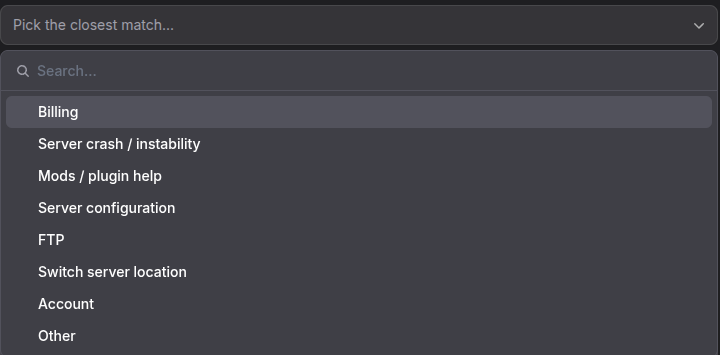
| Category | Use it for |
|---|---|
| Billing | Top-ups, charges, renewals and refunds. See Billing and Top-Up |
| Server crash / instability | The server crashes, freezes, lags or will not start |
| Mods / plugin help | Installing or fixing mods and plugins |
| Server configuration | Game settings, config files and server options |
| FTP | Requesting FTP access or problems logging in. See FTP Access |
| Switch server location | Moving your server to another location. See Server Moves |
| Account | Login, email and account settings |
| Other | Anything that does not fit above |
Step 3: Select Related Servers
Under Related servers, tick the servers the ticket is about. This is optional, but it saves staff from asking which server you mean. Only servers you own are listed.
Step 4: Write Your Message
Describe the problem in the Message box. It needs at least 6 words. A good message includes:
- What happened, and any error message word for word
- What you already tried
- When it started
The message is plain text. Paste error messages and console output directly into it.
Step 5: Send the Ticket
Click Open ticket. You are taken to the ticket page, and you get an email when staff reply.
Limits
You can have up to 3 open tickets at a time, and open one new ticket every 30 minutes. If you hit either limit, the New ticket button tells you why. Add new details to an existing ticket instead of opening another.
Ticket Status
| Status | Meaning |
|---|---|
| Awaiting staff | Waiting for a reply from FSHOST staff |
| Awaiting your reply | Staff have replied and need an answer from you |
| Closed | The ticket is finished |
Sending a reply always sets the ticket back to Awaiting staff.
Reply to a Ticket
Open the ticket from Your tickets, type in the Reply box at the bottom and click Send reply. Staff messages are marked (staff) after their name. Under your own messages you can see when staff have read them, for example Viewed by staff 5 minutes ago.
Reply Within 7 Days
If a ticket is waiting for your reply, you get a reminder email after 5 days. With no reply after 7 days, the ticket is closed automatically.
Close or Reopen a Ticket
Click Close ticket at the top of the ticket once your problem is solved, and confirm.
A closed ticket can be reopened by replying to it within 7 days. The page shows This ticket is closed. Replying will reopen it. above the reply box. A reopened ticket counts toward your 3 open tickets. After 7 days, open a new ticket instead.
Support on Discord
You can also get Pro support in the #pro-support channel on our Discord. To prove you are a Pro customer, you need a support code.
Step 1: Generate a Support Code
On the Support page, open Prefer Discord? and click Generate Support Code. The code is valid for 1 hour.
You need an active Pro server or a positive account balance to generate a code.
Step 2: Verify on Discord
- Join our Discord server
- Open the #pro-support channel
- Click the Get Pro Support button
- Enter your account email and the support code
Step 3: Open a Discord Ticket
Once verified, click Get Pro Support again to open a ticket.
Troubleshooting
I cannot click New ticket
You either have 3 open tickets already or opened a ticket less than 30 minutes ago. The text under the button says which. Close a ticket you no longer need, or add your question to an open one.
I did not get an email about a reply
Check your spam folder, and that the email on your account is correct. Replies always show on the ticket page as well, so open it from Your tickets on the Support page.
My ticket was closed but I still need help
Reply to it within 7 days of it closing and it reopens. After that, open a new ticket and mention the old Ref so staff can find it.
I am a team member and the server is not listed
Related servers only lists servers you own. Write the server number, for example P1234, in your message instead. Some requests, such as billing, have to come from the server owner.